Before you start
- Git integrations are available on Team plan workspaces.
- You need workspace permission to manage integrations.
- Create the repository connection in Ouraboard first, then add webhook in GitHub.
- Use the same repository in both systems. Owner/name must match exactly.
Step 1: Connect repository in Ouraboard
- Open Workspace Settings → Git.
- Set provider = GitHub.
- Fill:
- Repository owner (for
github.com/acme/my-repoit isacme) - Repository name (for
github.com/acme/my-repoit ismy-repo) - Webhook secret (generate a random string and keep it safe)
- Default branch (usually
main)
- Repository owner (for
- Click Connect.
- In Connected repositories, copy the full Webhook URL.
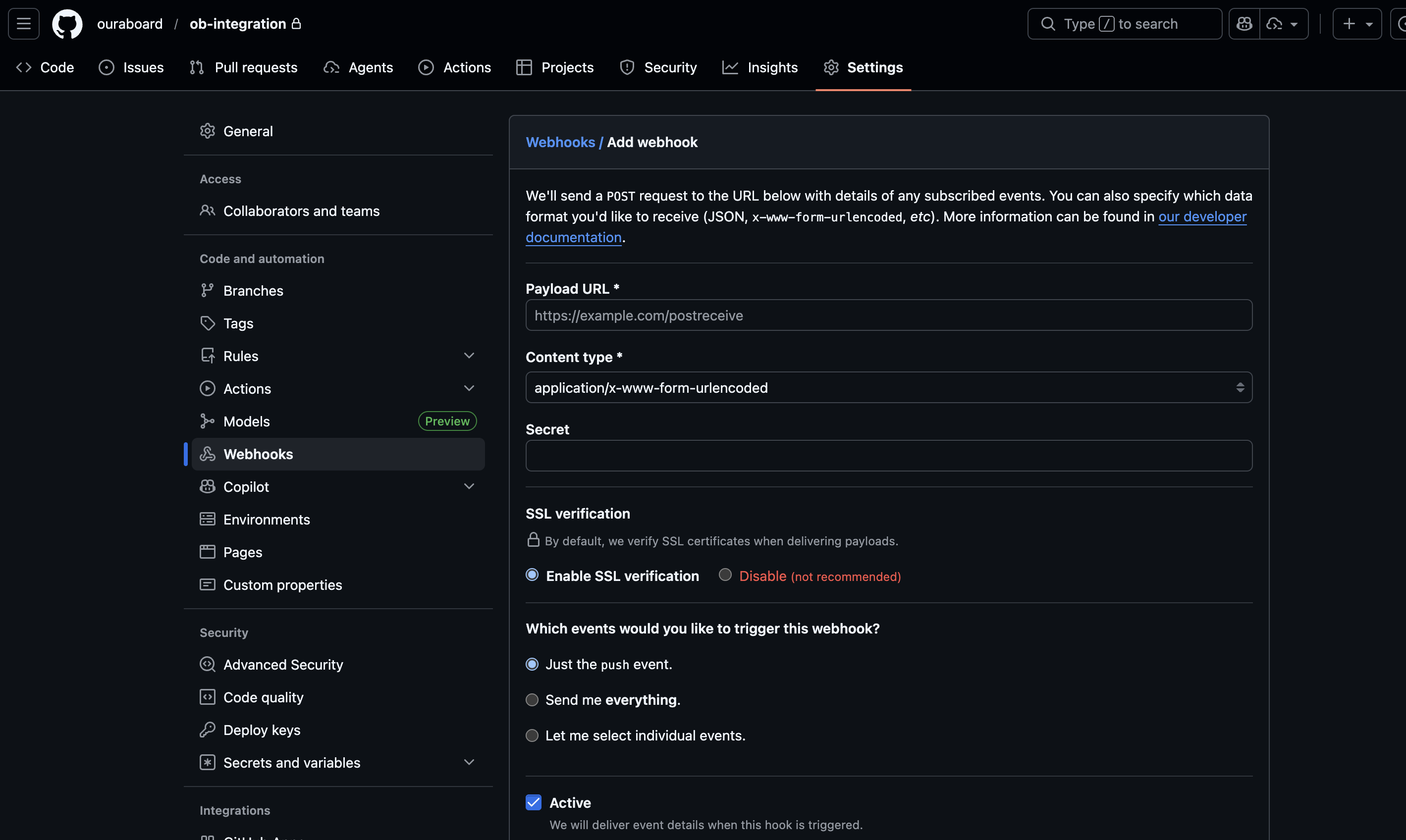
Step 2: Create GitHub webhook
- Open your repository on GitHub.
- Go to Settings → Webhooks.
- Click Add webhook.
- Paste webhook URL copied from Ouraboard.
- Select content type application/json.
- Paste the same secret from Ouraboard into the webhook secret field.
- Select events:
- Pushes
- Pull requests
- Keep webhook Active enabled and save.
Step 3: Verify end-to-end
- Create or pick an issue in Ouraboard (example slug:
PRJ-123). - Push a commit with slug in message (example:
fix: PRJ-123 webhook test). - Optionally open a PR with same slug in title or description.
- Open issue → Development tab and confirm commit/PR activity appears.
Issue linking rule
Include issue slug in branch, commit, or pull request text (example: PRJ-123) so activity is linked to the correct issue.
Recommended commit formats
fix: PRJ-123 handle GitHub webhook retriesfeat(PRJ-456): add development live updateschore: update deps [PRJ-789]
If no issue slug is present, event is accepted but not attached to an issue.
Default branch behavior
- Linking works for all branches when issue slug is present.
- Default branch is used for optional auto-move branch guard only.
- Enable branch guard if you want auto-move only when PR targets your default branch.
Security checks
- Signature validation must pass.
- Unknown repositories are rejected.
- GitHub webhook URL and secret must stay in sync with the active connection in Ouraboard.
Troubleshooting
Webhook repository does not match configured integration: check owner/name in Ouraboard vs GitHub repository URL.- Signature mismatch or 401/403: re-check webhook secret on both sides.
- If you archived the integration and created a new one, update GitHub to use the newest webhook URL and secret.
- No issue linked: ensure commit/PR text contains valid issue slug (for example
PRJ-123). - Webhook test fails: ensure webhook URL is full URL and publicly reachable from GitHub.
Screenshot