Before you start
- Git integrations are available on Team plan workspaces.
- You need workspace permission to manage integrations.
- You must create the repository connection in Ouraboard first, then configure GitLab webhook.
- Repository owner and name must exactly match the GitLab project path.
Step 1: Connect repository in Ouraboard
- Open Workspace Settings → Git.
- Set provider = GitLab.
- Fill:
- Repository owner = full GitLab namespace/group path, without the repository name
- For
gitlab.com/acme/platform/my-repo, use owneracme/platform - Repository name (for
gitlab.com/acme/platform/my-repoit ismy-repo) - Webhook secret (or use Generate)
- Default branch (usually
main)
- Click Connect.
- In Connected repositories, copy the full Webhook URL using Copy URL.
You do not need to manually build URL or integration ID. Use the value shown in the connected repository row.
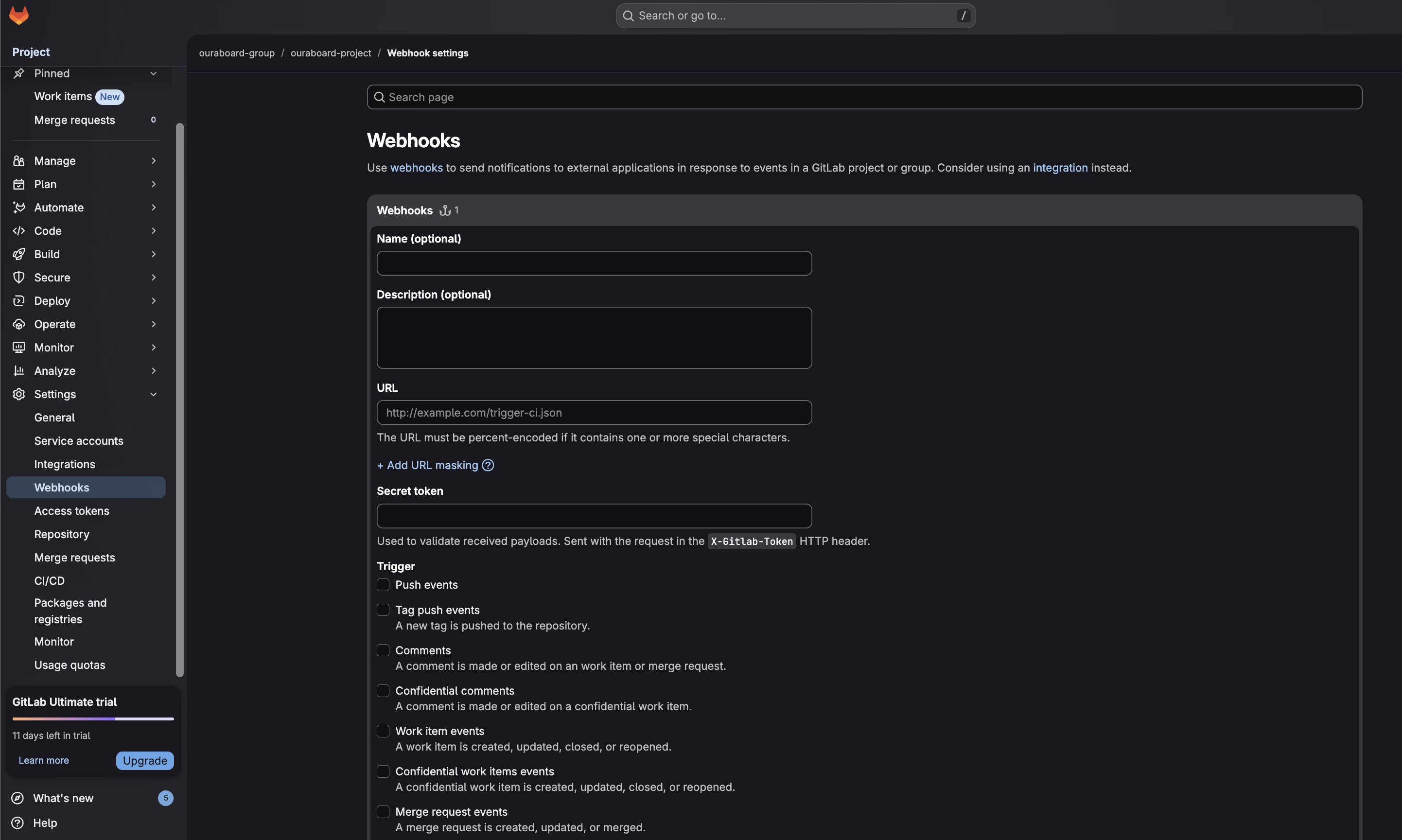
Step 2: Create GitLab webhook
- Open your repository in GitLab.
- Go to Settings → Webhooks.
- Paste the Webhook URL copied from Ouraboard.
- Paste the same Webhook secret into GitLab secret token field.
- Select:
- Push events
- Merge request events
- Save webhook.
Step 3: Verify end-to-end
- Create or pick issue in Ouraboard (example slug:
PRJ-123). - Push commit with slug in message (example:
fix: PRJ-123 gitlab test). - Optionally create MR with slug in title/description.
- Open issue → Development tab and verify activity is linked.
Issue linking rule
Include issue slug in commit message or merge request title/description (example: PRJ-123).
Example: fix: PRJ-123 update webhook handling
Recommended commit formats
fix: PRJ-123 update webhook validationfeat(PRJ-456): add git activity feedchore: cleanup pipeline [PRJ-789]
If no issue slug is present, webhook delivery succeeds but no issue will be linked.
Default branch behavior
- Default branch is used only for optional auto-move branch guard.
- Activity linking from commits/MRs works on any branch if issue slug is present.
- Enable Auto move only when PR/MR targets default branch to avoid moving issues from feature-to-feature merge requests.
Security checks
- Webhook secret is verified for each delivery.
- Unknown projects are rejected.
- Duplicate delivery payloads are deduplicated.
Troubleshooting
Webhook repository does not match configured integration: verify owner/name in Ouraboard match the full GitLab project path, including subgroups.Request method 'GET' is not supportedin webhook test: this is expected for browser GET; GitLab must send POST JSON deliveries.- Secret mismatch / 401/403: update secret token in GitLab to match Ouraboard.
- If you archived the old connection and created a new one, GitLab must be updated to the newest webhook URL and secret.
- No issue linked: include slug like
PRJ-123in commit or MR text.
Screenshot